
 Español
  English
  Português
  Français
  Italiano
  Deutsch
  Polski
  Nederlands
 How it works
Reset Installation via USB connection
What exactly is it?
- We sell an Installation, NOT a Repair
- Tied to a Single PC
- 100% Self-Service Process and Connection
- Using Windows Defender ONLY is a MANDATORY REQUIREMENT.
Benefits of our service
Autonomy, transparency and proven backing: we give you control so your printer works again.

100% Autonomous Reset
Do it yourself by following our videos, at your own pace and without depending on technicians or schedules.

No Trips, No Waiting
You don't need to take the printer anywhere or book a technician. You do it yourself, at home or at the office, whenever you want.

Installed on Your Own PC
You download the installer and set it up for your printer model. Everything is done from your Windows PC.

Total Privacy
We do not provide remote assistance or access your PC. You run the process and stay in control of your computer.

Proven Track Record
Total confidence. We have over 920 five-star ratings from real, satisfied customers.

Try It Before You Buy
Have doubts? Request a Trial Key over WhatsApp, once only, and check it for yourself.

No Expiry
Your installation lasts as long as you decide: 1 day or 20 years. It is tied to your PC, for use on a single computer.

24/7 Support
Professional, human technical support, always available whenever your business needs it most.

Clear Compatibility
You know exactly which errors it covers before buying: Epson, Canon and Epson SC plotters.

USB Cable Only
You only need your Windows PC and the printer connected by USB cable. Everything happens on your own computer.

Reinstall Without Losing Your Activation
If the antivirus deletes the program by mistake, the "Reinstall" button recovers it without losing your activation (if you haven't formatted the PC).
Here's how the process works, step by step


Identify the Problem
Model: Epson | Error: Ink Pad. After you contact us, we ask for this information to immediately verify that a compatible reset is available and make sure the error can be fixed before moving forward.
2


Requirements and USB Connection
- PC with Windows (7, 8, 10, or 11).
- Tied to a Single PC
- We sell an Installation, NOT a Repair
- 100% Self-Service Process and Connection
- Using Windows Defender ONLY is a MANDATORY REQUIREMENT.
- The program does NOT fix physical problems, print quality, printhead cleaning, the maintenance box or cartridge failures.


Exclude the Antivirus, Configure and Download the Installation
Exclude the C:\ResetEntuPc.com folder in Windows Defender, open the installer, choose your model and download your reset installation.
4


Price, Payment Method and Buying Your Key
We capture your country to show you local prices and payment methods.
The cost covers the installation on a single PC. Once the Key is delivered there are no refunds; that is why you can first request a Trial Key (for testing), once only.
5


100% Autonomous Reset installed on your PC by following the steps
With the reset already installed on your PC, you follow the program's steps to set the counter of your Epson back to zero.
6


Printer Unlocked and Ready
Your printer is fully operational again, unblocked and ready to resume printing right away.
Identifying the error: Ink Pad
Does your Epson L3210 printer show a message like "An ink pad has reached the end of its service life"?
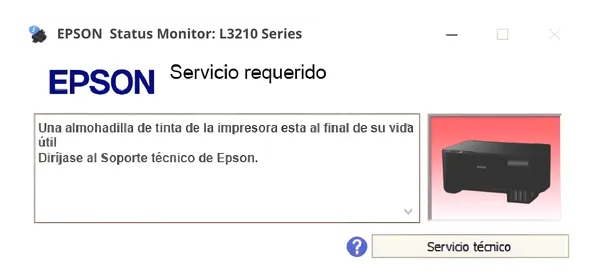
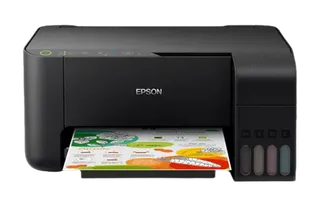
Requirements and USB connection
- Epson printer powered on and connected via USB cable to the computer
- Canon printer in service mode and connected via USB cable to the computer
- Epson-SC printer in repair mode and connected via USB cable to the computer
- Epson-SC printer in inspection mode and connected via USB cable to the computer
- Error "Ink Pad" verified.
- PC with Windows (7, 8, 10, or 11).
- Stable internet connection.
- Tied to a Single PC
- We sell an Installation, NOT a Repair
- 100% Self-Service Process and Connection
- Using Windows Defender ONLY is a MANDATORY REQUIREMENT.
- The program does NOT fix physical problems, print quality, printhead cleaning, the maintenance box or cartridge failures.
- Perform a 100% spotless cleaning of the ink sensor and plastic parts, and the ink pad must be new before the reset.
Exclude the Antivirus, Configure and Download the Installation
How to do it, step by step
Exclude the antivirus
Create the C:\ResetEntuPc.com folder and add it as an exclusion in Windows Defender: Windows Security › Virus & threat protection › Manage settings › Exclusions › Add an exclusion › Folder.
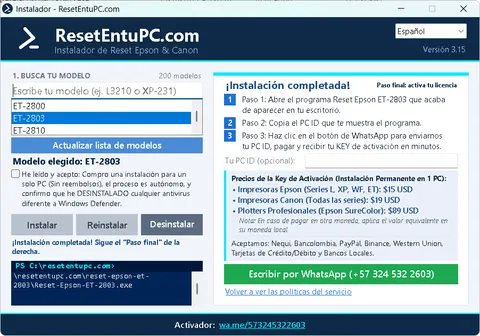
Configuration
Download and open the installer. Type your model, accept the conditions (installation for 1 PC only, no refunds) and click “Install”.
Download InstallerThe process is 100% Autonomous and an antivirus exclusion is required
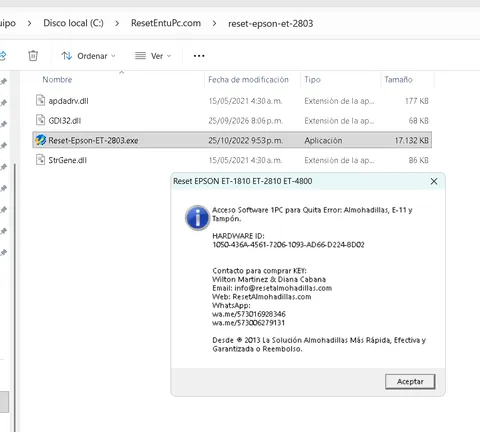
Download the installation
The installer downloads your model's reset into C:\ResetEntuPc.com. Open it, copy the Hardware ID it shows and message us on WhatsApp to buy your KEY.
Installation Price and Buying Your Key
Copy your PC ID and message us on WhatsApp: we tell you the price for your country and payment methods, and generate your Key to activate the installation on that PC. Beforehand you can request a Trial Key (for testing), once only.
100% Autonomous Reset installed on your PC by following the steps
Printer unlocked and ready to print

Over 920 customers already got their printers back
What people say who already trusted our reset service


Frequently asked questions
What exactly am I buying?
An Installation: the right to install the reset software on a single PC. The activation key (Key) is only the means to enable the program; what we provide is the installation.
Can I try it before buying?
Yes. If you want to be sure before buying, request a Trial Key over WhatsApp. It is provided only once.
Is there a refund if the program doesn't fix my problem?
Since what we sell is an installation, there are no refunds once the Key has been delivered, whether or not the program fixes your printer's problem. That's why, before buying, check which errors it covers and, if you wish, test it with the Trial Key.
On how many computers can I use it, and how long does it last?
The installation is tied to the PC where it is activated and lasts as long as you decide: it can be 1 day or 20 years. If you format the PC, change the hard drive or move it to another computer, the installation is lost and you would need to buy a new one.
Which errors does it fix, and which not?
It only resets the ink pad counters. Epson: ink pad error, E11 and cap error. Canon: 5B00, 1700, P07 and E08. Epson SC plotters: 00000008, 00080000, 00040000, 00000004, 00010000, 00000001, 0014BD. It does not fix physical problems, print quality, printhead cleaning, the maintenance box or cartridge failures.
Do I have to do it myself, or do you access my PC?
It is a "do it yourself" service: you run the process by following our videos and stay in full control of your computer. We do not provide remote assistance or access your PC. You only need to connect the printer with a USB cable.
Which antivirus do I need to use?
Only Windows Defender. If you have any other antivirus, you must uninstall it completely (pausing it is not enough). You also need to exclude the folder C:\ResetEntuPc.com in Windows Defender.
What if the antivirus deletes the program?
The installation manager includes a "Reinstall" button. If the antivirus removes the program by mistake, you can recover it with that button without losing your activation, as long as you have not formatted the PC.
How do I get my Key?
You download the installer, install the reset for your printer model and copy your PC ID. Then you message us on WhatsApp with that ID and we generate your Key to activate it.